Wednesday, June 30, 2010

Some screenshots


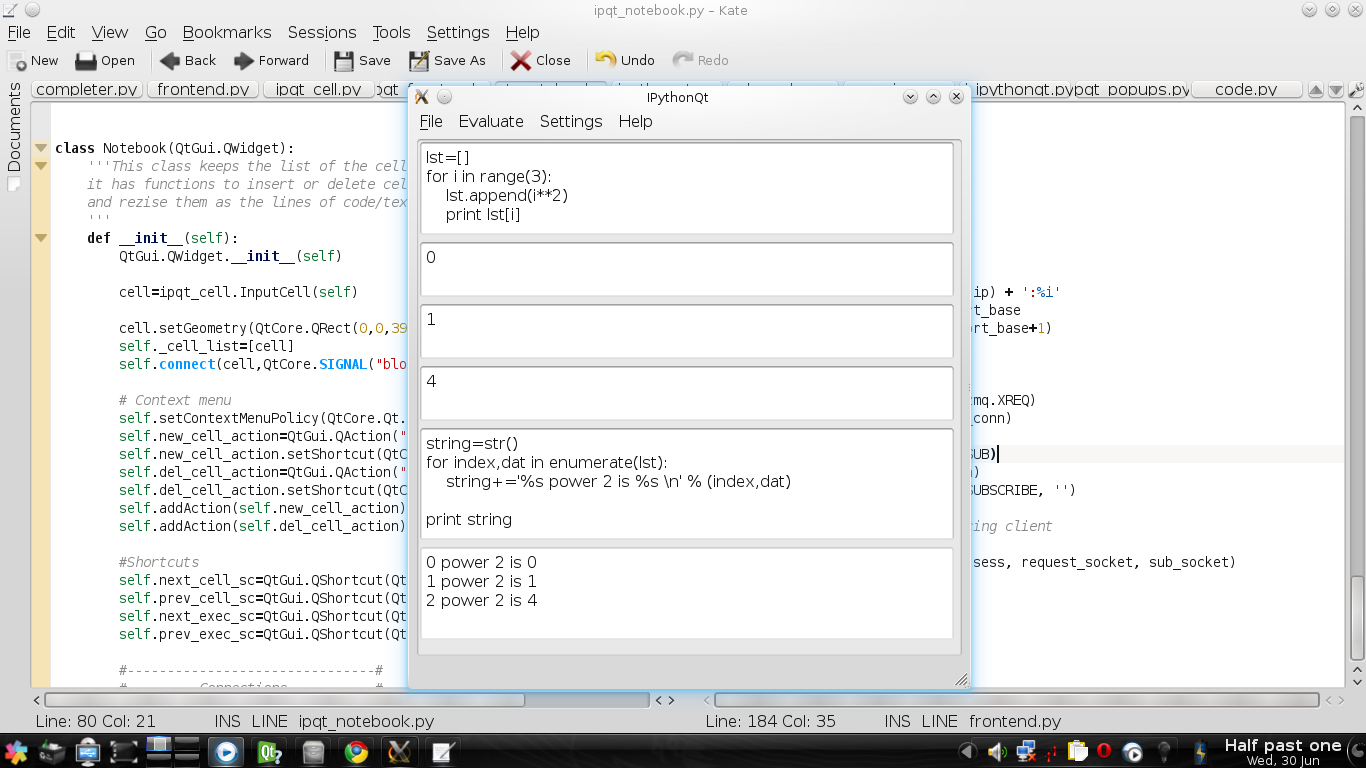
Bryan suggested some screen shots of what's working. Just a pair of very, very simple examples:

Here we can see the main function of the frontend (run code) and some of its code in the back. (Yes, I'm very used to graphical editors)

And here we can see my yakuake terminal with some useless stuff and a terminal frontend for ipython which connects to the same kernel (i.e.communicate through the same ports), this one changing the value of 'a' which has been already assigned in the IPythonQt window, so a message appears in the new widget on the right (plz don't heed the preview).

Tuesday, June 29, 2010

Added features to June 29

What can you do?
When you open IPythonQt you see a menubar and a (still undeletable) input cell in which you can write ipython/python code.
You can execute the code written by pressing Ctrl+Return (shift doesn't work, I dunno why), or just go to the menu 'evaluate'.
You can call a context menu inside the cell which besides the standard buttons it has a new one to delete the cell.
If you right-click somewhere else in the notebook, a tiny context menu should appear to append a new input cell or to delete the last focused cell. A focused cell is the last you clicked, not the last you hover.
If you connect another frontend to the same kernel, another widget will come out with the info of the variables that changed and the user.
Some shortcuts has been created for the keyboard lover:
Ctrl+UpArrow goes to the previous cell
Ctrl+DownArrow goes to the next cell
Ctrl+Shift+UpArrow goes to the previous executable cell
Ctrl+Shift+DownArrow goes tot he next executable cell
Ctrl+Shift+N appends a new cell
Ctrl+Shift+Delete removes the current cell
Ctrl+Return Executes the current cell if it's executable
Ctrl+Q Quits

What you cannot do (yet):
The code still doesn't capture pyout, so code like:
_cell__
|a=10  |
|a        |
won't produce any output.
Calls to raw_input, %, !, system commands, tab completion, function tooltips, gdb and help.

Work right in progress:
Stdin support, since I have to have it finished for the mid-term evaluation, it's the main concern. The popup widget it's finished but there's still the raw_input function in the kernel that needs to be implemented correctly.
There's a new output cell if the same input cell is modified.
There's a discussion in the mailing list about if the different outputs from the same input should be on different cells (packable) or in the same cell.
The resizing of the cell when the block(line without '/n') is larger than the size of the window. For what I've seen this is not trivial.
Testing IPythonQt

For you to test IPythonQt you first need to set up some stuff first:

  1. Install the following: git g++ cython uuid-dev python-qt4-dev pyqt4-dev-tools , I think that would be enough.
  2. You also need to install zeromq and pyzmq from sources here's a good guide to do that.
  3. Take into account that you need python2.6.
Now you can download IPythonQt's code from http://github.com/muzgash/ipython/tree/ipythonqt
check if you are in the right_branch (ipythonqt, not master): git branch
if not right_branch:
    git checkout ipythonqt
cd ipython/IPython/gui/qt
run ./kernel.py
Open a new terminal and run ./ipythonqt.py

Obviously it's not working with all its features, I just remove some dock widgets that were in the original design of the main view, but they're just commented because they don't do anything yet.

Tuesday, June 1, 2010

Repositories GitHub

You can check the progress at GitHub:
http://github.com/muzgash/ipython

The commits are a little slow because some issues with GitHub and its ssh keys

Sunday, April 18, 2010

Possible future directions

The near future will bring the feature of saving and loading sessions, also importing and exporting to different formats like rst, html, pdf and python/ipython code, a discussion about this is taking place in the ipython-dev mailing list. Also the interaction with a remote kernel and distributed computation which is an IPython's project already in development.

The idea of a mathematica-like help widget (i.e. there will be parts of it that will execute as a native session of IPythonQt) is still to be discussed in the development mailing list but it's definitively a great idea.

Friday, April 16, 2010

Preliminary work

I have already developed a prototype using Qt that provides individual QTextEdit widgets for each block of user input. This makes it possible to have an editable cell be independent from the area where output or errors are displayed (which can't be achieved if a single widget like QTableWidget is used for the entire UI). The screenshot above shows this basic interface, where formatting and write control are handled independently for each area.
I also explored other tools such as QScintilla and OpenModelica (wrapping its interface with Cython) but due to license incompatibilities (GPL) decided against using these and will rely solely on Qt.

Schedule

  • Week 1: Simple client/server pyzmq module implemented from the previous work to the GUI needs.
  • Week 2 and 3: Multiline input in a cell form that is sent to the kernel as a string, each cell has its own widget so they can be edited indepently.
  • Week 4-5: Capture all output streams from kernel and properly format exceptions and errors. Display streams corresponding to other clients that may be connected to the same kernel in a separate widget so they don't confuse the user. This output will be asynchronous, so it should be handled in the GUI without blocking the user input widget.
  • Week 6: Stdin support: only one frontend at a time can communicate with raw_input calls made by the kernel. API for frontends to grab stdin.
  • Week 7: debugger support. IPython calls a modified pdb, which reads from stdin using raw_input. So once raw_input handling is ready, it becomes possible to redirect the pdb session from the kernel to the GUI.
  • Week 8: Subprocess support (print output of 'ls' in gui, for example).
  • Week 9: Tab completion and function tooltips (GUI popup with the function details). Must gracefully timeout and avoid trying if kernel is busy
  • Week 10: padding for any slip in previous schedule.